Hood Warfare 2: how to play with friends
Choose party invites or a private password lobby, check your game version, and distinguish current multiplayer options from launch-week advice.
Applies to: PC Steam; developer updates through 1.0.2.0, dated 22 October 2026
The short answer
Use the party-invite system to group up and queue together, or create a private password match for an invite-only session. PARTY invites were added in update 1.0.1.7; older advice that only describes trying to enter the same public match is incomplete. Check that everyone has the same current build before troubleshooting.
On this page
Choose a party or a private match
These options solve different problems. Use a party when your group wants to enter matches together; choose a password-protected private match when you want to control who can enter the session. Public Quick Play alone is not the same as forming a group.
| Your aim | Relevant option | Evidence |
|---|---|---|
| Invite friends and queue together | PARTY invites | Added in update 1.0.1.7 |
| Limit entry to invited people | Private password match | Added in update 1.0.1.4 |
| Choose session settings | Create Game | Later updates expanded map and mode options |
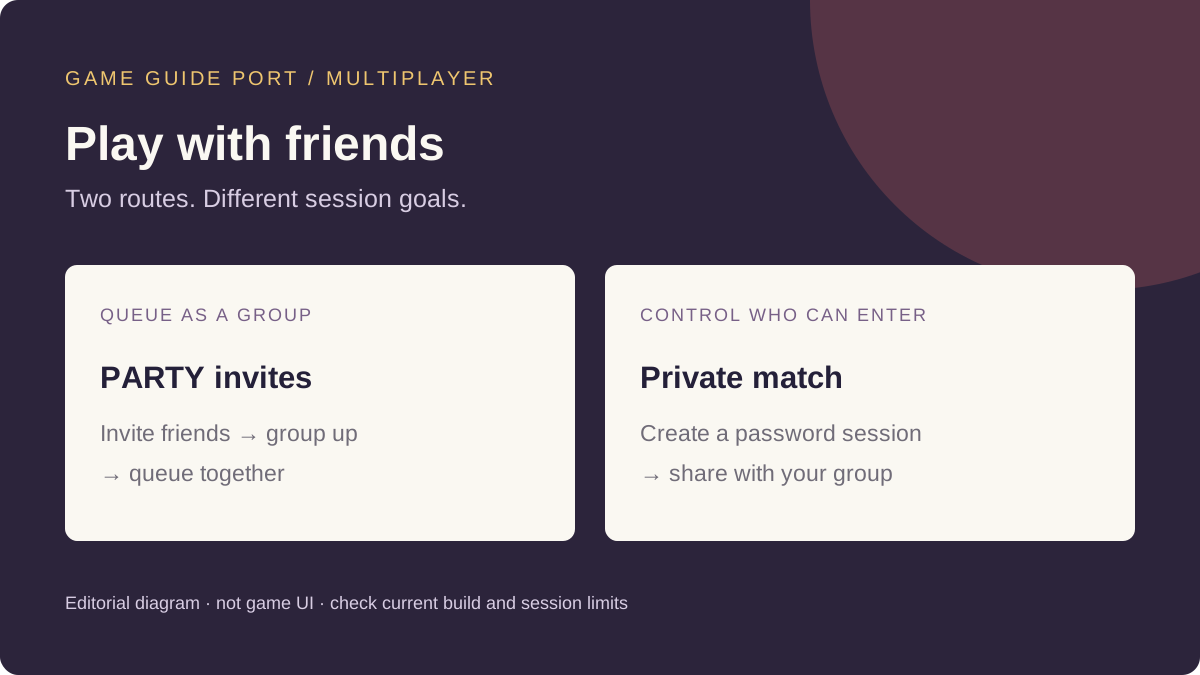
Group up before you queue
- Update the game on everyone’s PC. The developer’s 22 October announcement identifies build 1.0.2.0 and explains that fully exiting Steam may be needed to receive the update.
- Use the game’s PARTY invitation feature to invite your friends. This is the documented group feature; the precise current button positions have not been independently verified here.
- Have the group accept the invitations, then use the party’s queue route to join together. If that flow differs on your build, check the current developer notes before following launch-week screenshots.
Use a private password match
Choose the private-match route when your group wants an invite-only session. Have one person create the password-protected match and share its password privately with the intended players. Verify the password and that everyone is attempting the same session if someone cannot enter.
The store describes Create/Join Game options for choosing map, mode and match settings, including bot-filled teams. Do not assume every setting applies identically to every session type without checking the current screen.
When joining does not work
- Different builds: compare the version displayed by each game installation. Restart Steam and install any available update before trying again.
- Invitation or session mismatch: distinguish a party invite from joining a password match. Recheck the intended session and any password.
- Repeated failure: record the exact error, whether it occurs before or after accepting an invite, and whether it affects one player or the whole group. These are editorial checks to improve a report, not proven diagnoses.
The 22 October update confirms the existence of official servers and changes to anti-cheat. That makes a blanket claim that every match uses one particular hosting model unreliable; the announcement does not explain every private-session networking detail.
What still needs in-game verification
The sources checked here do not establish a complete current button-by-button route, a maximum party size, the private-session player cap or whether parties persist across every match transition. This guide does not invent those limits or guarantee that a connection checklist will repair a specific error.
Sources and review scope
- Hood Warfare 2: official developer announcements — party invites, private matches, update delivery and server changes.
- Hood Warfare 2: developer’s Steam store description — Create/Join Game settings and bot options.
Checked 27 October 2026. Recheck after party, matchmaking, private-session or interface updates. Exact UI steps and player limits require current game evidence before this representative page completes publication review.
Continue in Hood Warfare 2

Hood Warfare 2 Player Count and Steam Charts
Live Hood Warfare 2 player numbers from the official Steam API, and why SteamDB, Steam Charts and other trackers show different totals.
Is Hood Warfare 2 on PS5 or Xbox?
Hood Warfare 2 is PC-only. No PS5, PS4, Xbox, Switch or mobile version exists, and no console port has been announced — official platform data, checked October 14, 2026.

Hood Warfare 2 Patch Notes and Current Status
Every Hood Warfare 2 patch since launch — 1.0.10 on October 12 and 1.0.1.4 on October 14, 2026 — and which reported launch problems are now fixed.

Hood Warfare 2 Troubleshooting: Crashes and Kicks
Fix Hood Warfare 2 crashes, connection failures and anti-cheat false kicks, symptom by symptom — and see what the October 14 patch already resolved.

Hood Warfare 2 Price and Editions - Is It Worth It?
Hood Warfare 2 costs $5.99, currently $5.39 in a launch discount ending October 15, 2026. There is only one edition: no Deluxe, no DLC, no microtransactions.

How to Play Hood Warfare 2: Getting Started
New to Hood Warfare 2? How to get into your first match, what the six modes are, and the systems you meet — plus the one caveat about weapon stats.

Hood Warfare 2 Game Modes Explained
All six Hood Warfare 2 modes explained in the developer's own words: Turf War, GangBang, Chaos, Hit A Lick, Destroy The Block and Chain Snatch.

Hood Warfare 2 Maps List
Every confirmed Hood Warfare 2 map — Downtown, Suburbs, The Trenches, Chicago Mall and Supermarket — with the official source for each name.
Hood Warfare 2 Loadouts and Attachments
How Hood Warfare 2 attachments, perks and equipment work, and an honest note on why this site publishes no weapon tier list.

Hood Warfare 2 Progression and XP Explained
How Hood Warfare 2 progression works, what you unlock, and what the developer's patch notes say about the "my level reset" reports.

Hood Warfare 2 Killstreaks List
What is known about Hood Warfare 2 killstreaks — Snitch, Homies and Driveby — and an honest note on where that information comes from.
Hood Warfare 2: Can You Play Solo Against Bots?
Yes — Hood Warfare 2 supports bot matches and its store listing includes single-player. What the developer confirms, and what it leaves unsaid.

Hood Warfare 2 Controversy Explained
A neutral look at the two Hood Warfare 2 controversies — AI-generation claims and stereotype criticism — with the developer's own disclaimer quoted in full.
Hood Warfare 2 Mods and Steam Workshop Status
Hood Warfare 2 has no Steam Workshop, no official mod support and no public SDK as of October 14, 2026. What the developer has and has not said.